 Virtual electronics workbench

Draw a circuit, switch it on, and measure it with real-feeling bench instruments.
Ohmforge is a free electronics lab in your browser: a schematic editor with 40+ parts, its own SPICE-style simulator (DC operating point, DC sweep, AC/Bode and transient analysis) and virtual instruments – multimeter, 4-channel oscilloscope, function generator, current-limited bench supply, Bode plotter and logic probe. Current flow is animated, voltages are colour-coded and overloaded parts burn out, so you see what a circuit does before you build it. Everything runs locally; projects stay on your device.

Screenshots
 Live simulation: a 555 blinker with the 4-channel oscilloscope
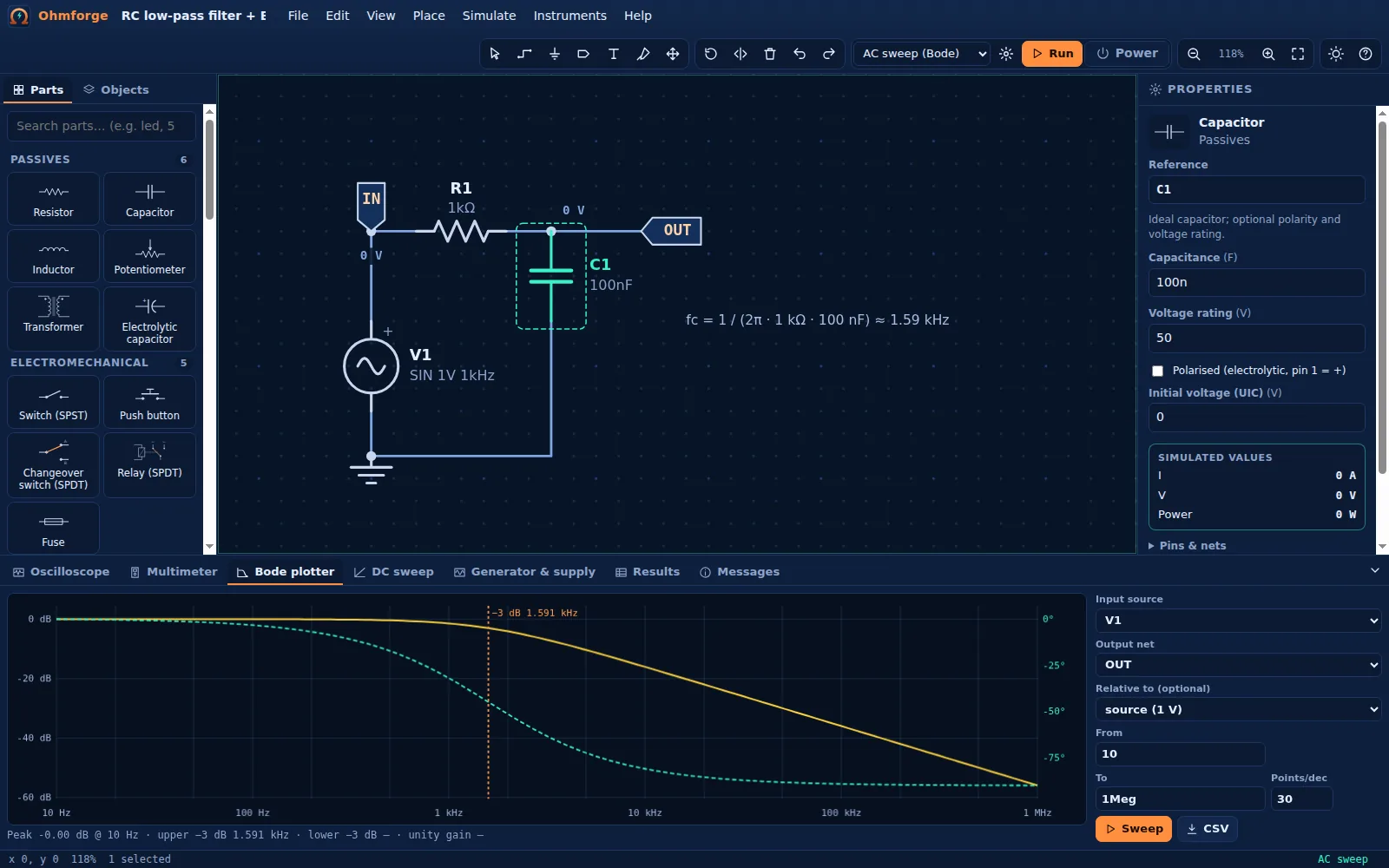 Bode plotter: RC low-pass, −3 dB at 1.59 kHz
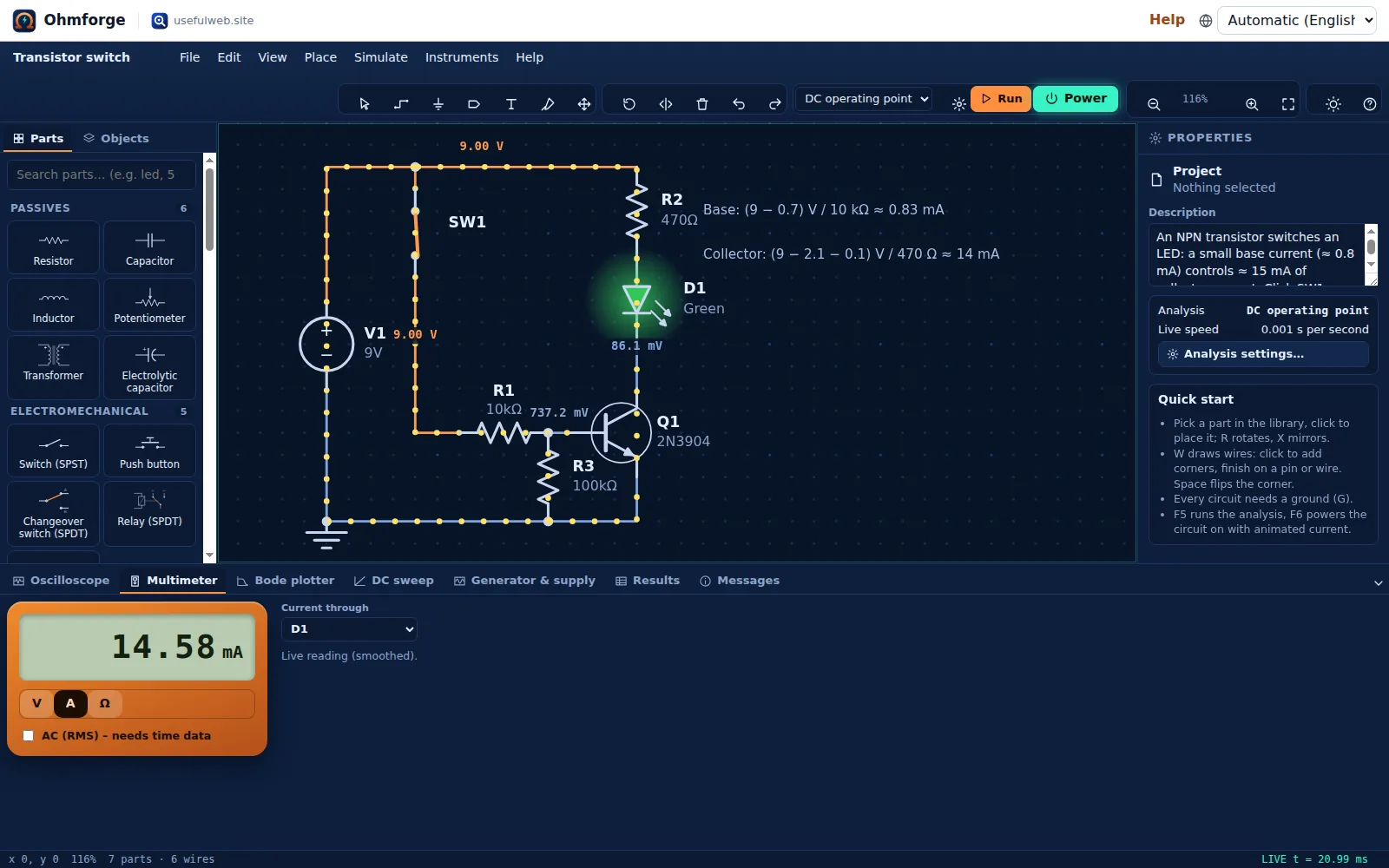 Animated current flow and voltage colouring
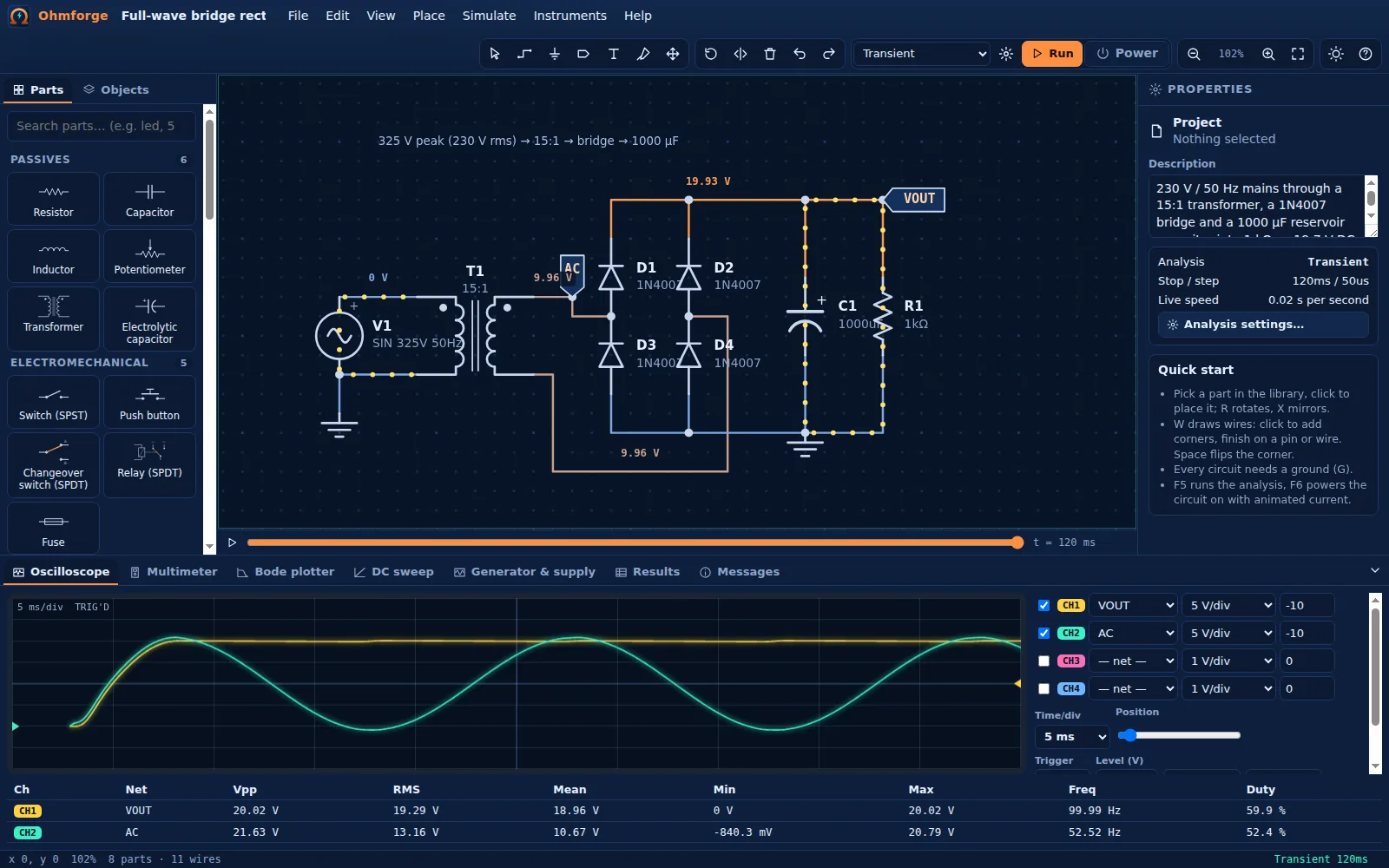 Bridge rectifier: ripple measured on the scope
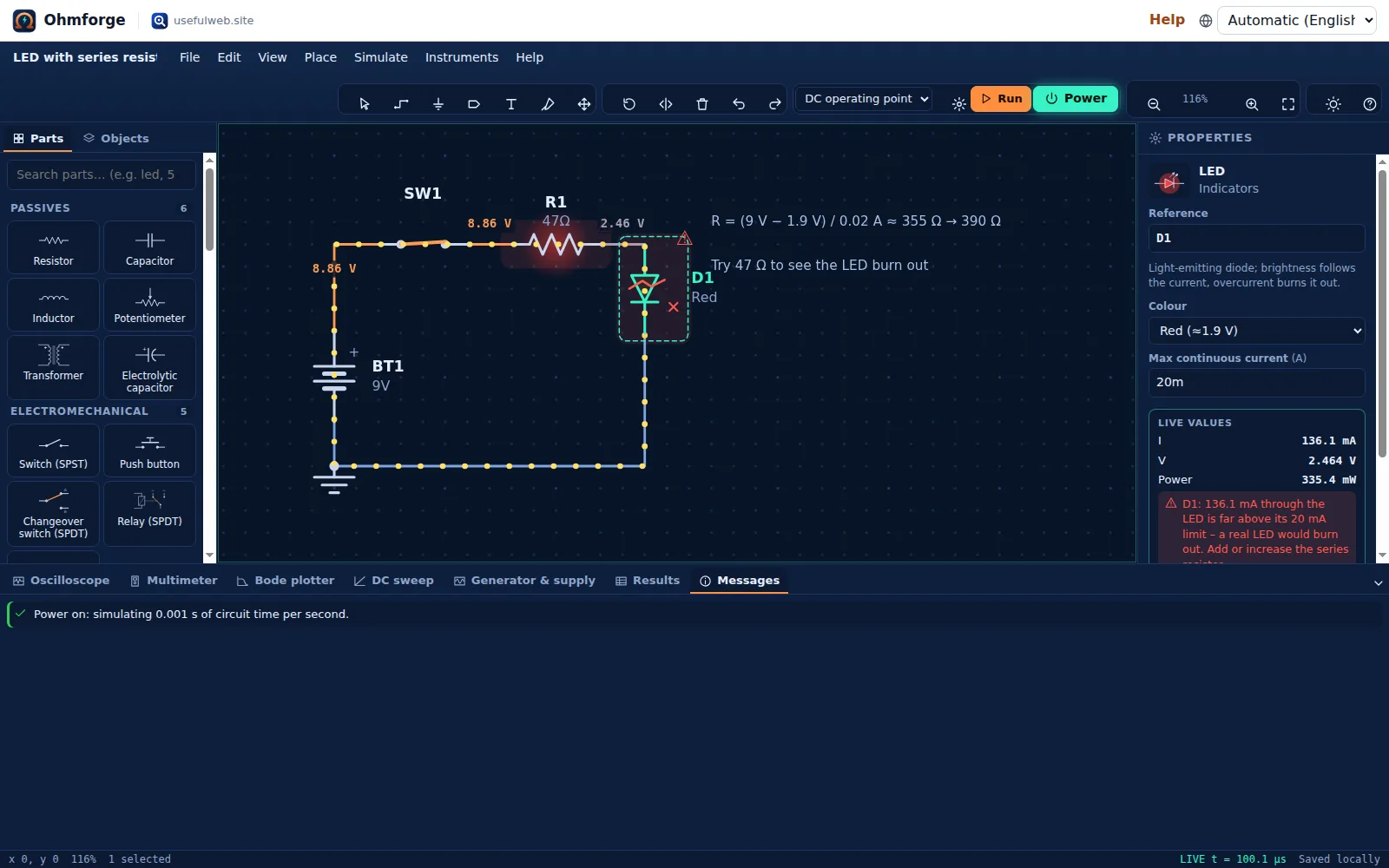 Stress warnings: an overdriven LED burns out
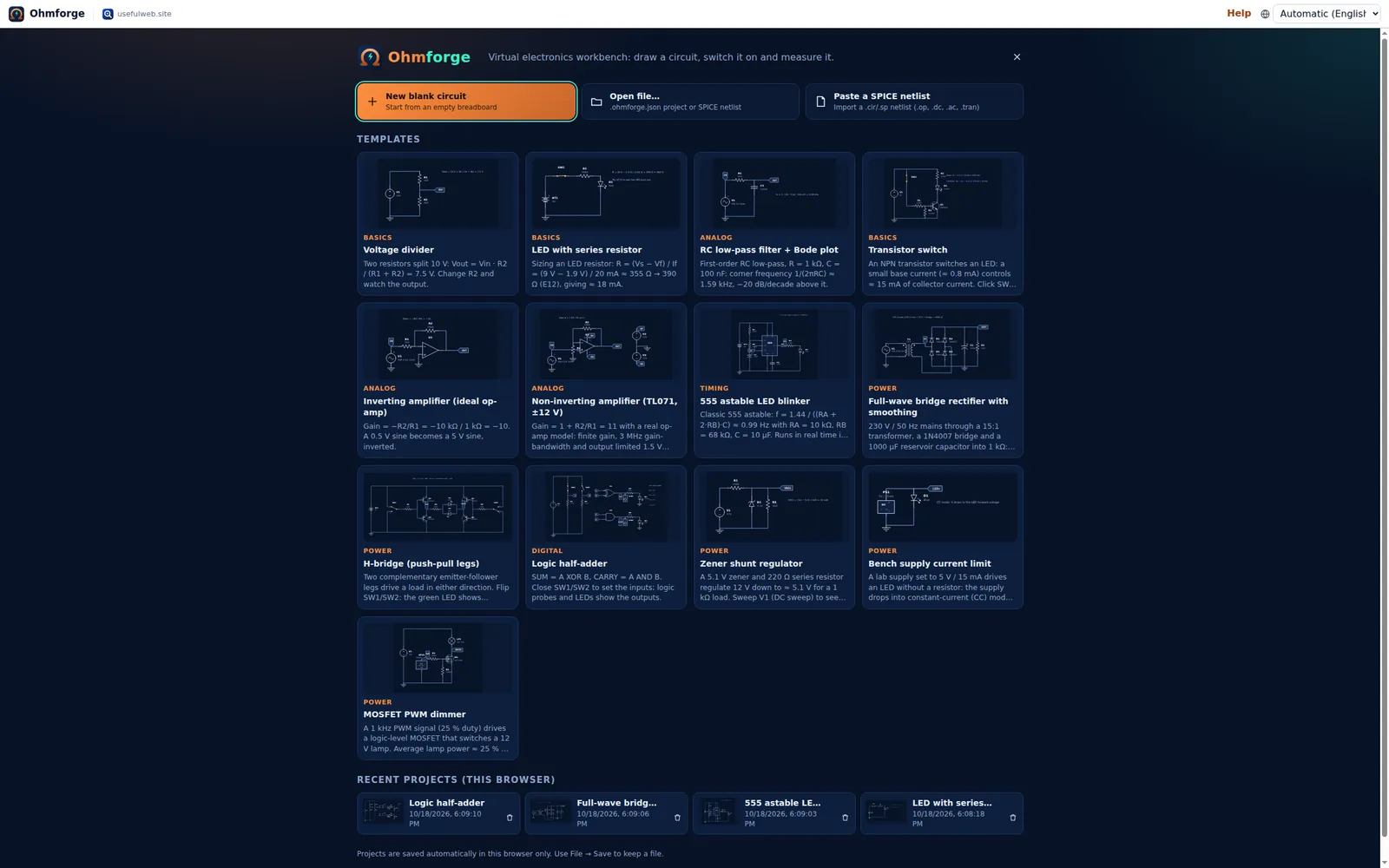 Start screen with templates and recent projects
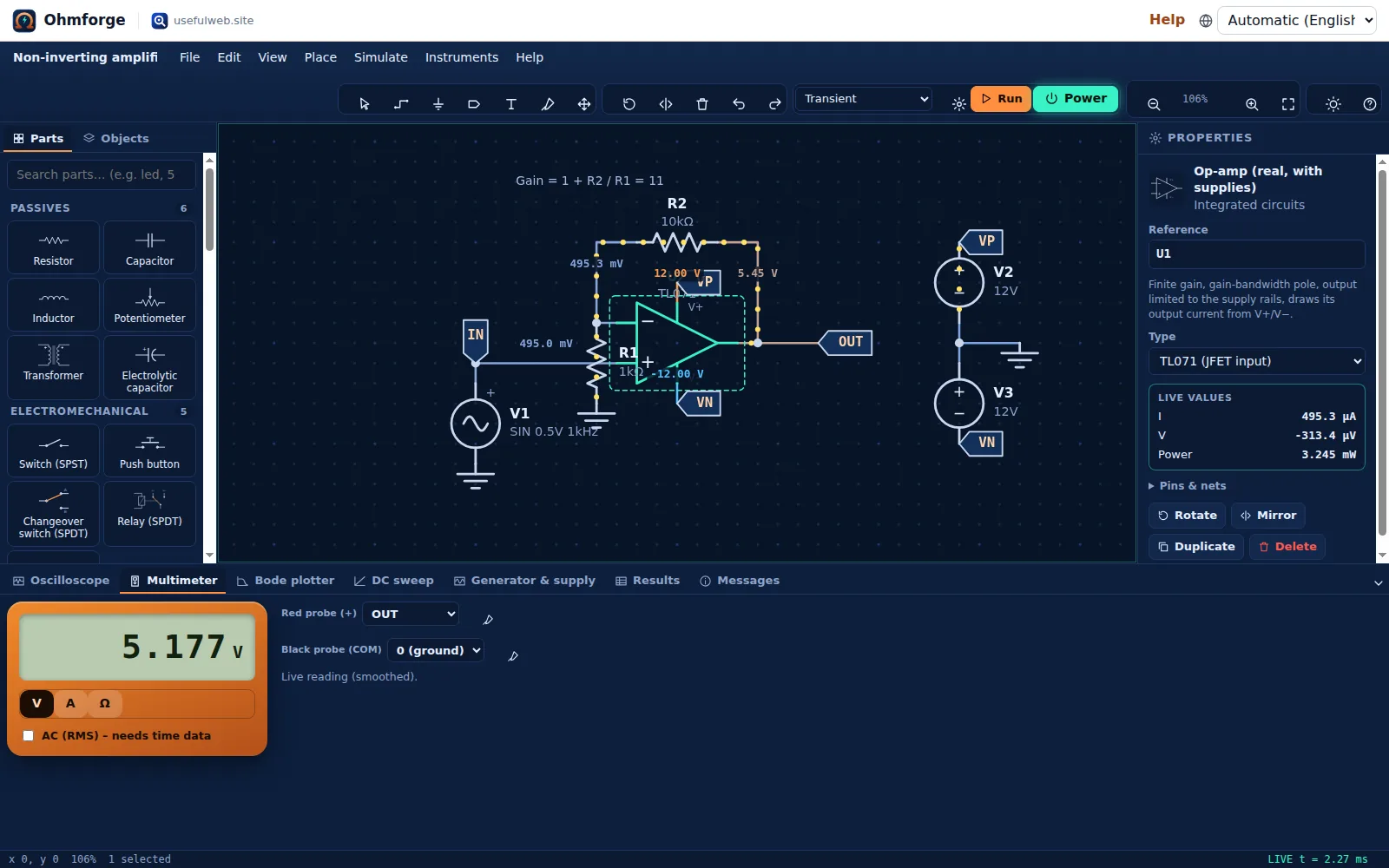 Real op-amp model, multimeter and inspector
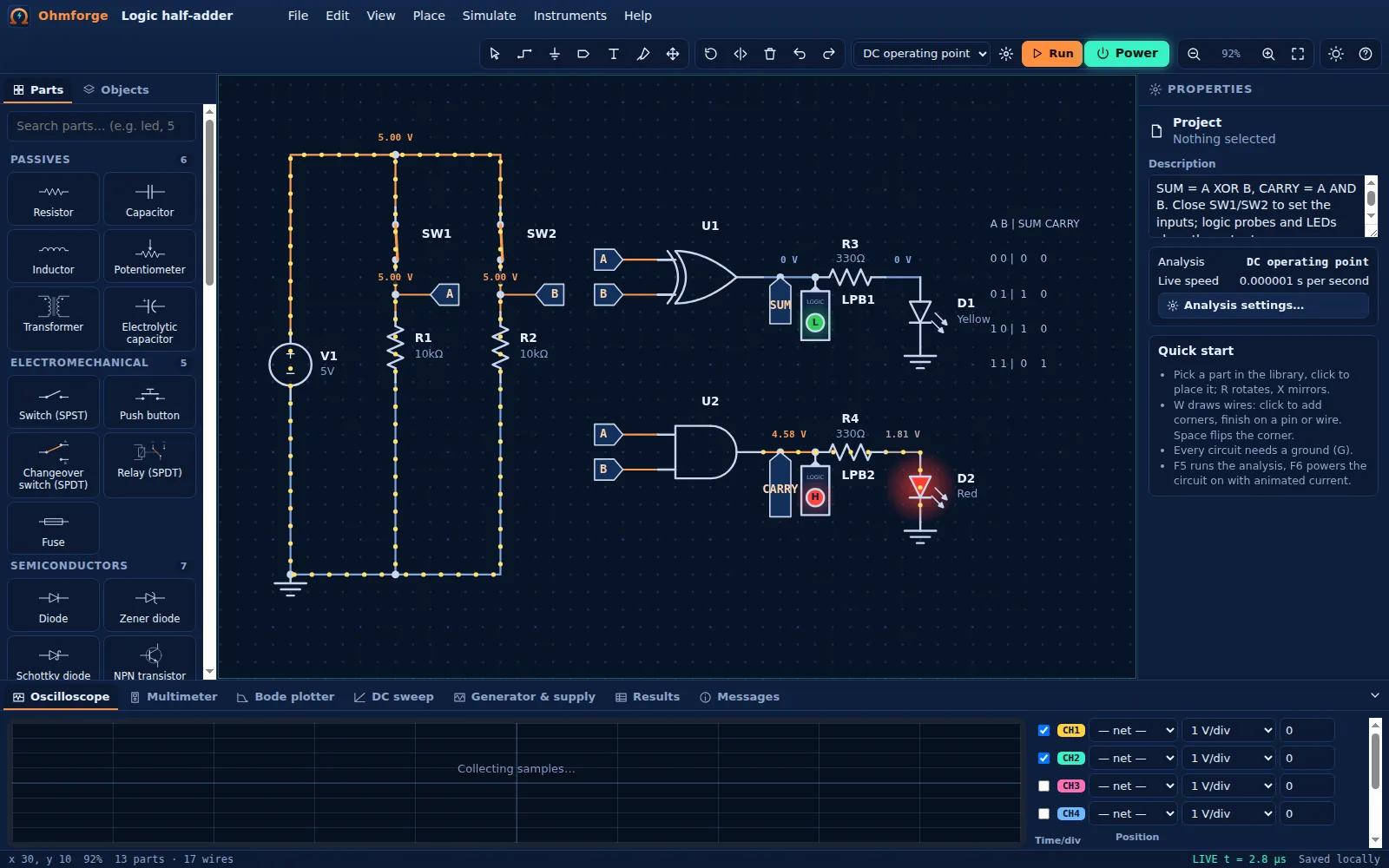 Digital logic: half-adder with logic probes
Features
Schematic editor
Grid snapping, orthogonal wires that re-route when you drag parts, junction dots, net labels, ground, rotate and mirror.
40+ parts
R, C, L, pots, switches, LEDs, diodes, zeners, Schottkys, BJTs, MOSFETs, op-amps, comparator, 555, logic gates, 7-segment, relay, transformer and more.
Own SPICE-style engine
Modified Nodal Analysis with Newton–Raphson, junction limiting, damping, gmin and source stepping – no plug-ins, no server.
Transient analysis
Trapezoidal or backward-Euler integration with adaptive time steps, breakpoints and event detection for 555 timers and relays.
AC sweep & Bode plotter
Small-signal frequency response with magnitude, phase, −3 dB corners and unity-gain frequency.
4-channel oscilloscope
Timebase, V/div, offsets, edge trigger, cursors and automatic Vpp, RMS, mean and frequency readouts.
Multimeter
Volts between any two nets, current through any part, and resistance with the power off – like a real DMM.
Generator & bench supply
Sine/square/triangle/sawtooth generator with 50 Ω output and an adjustable supply that drops into constant-current mode.
Animated current flow
Moving dots show where current goes and how much; wires glow with their voltage. Flip switches while it runs.
Stress warnings
Resistors over their wattage, LEDs without a resistor (shown burnt), reversed electrolytics and blown fuses are flagged in plain words.
SPICE import/export
Read and write netlists (R C L V I D Q M E G K, .model, .op .dc .ac .tran, SIN/PULSE/PWL).
Exports & print
Schematic as SVG or PNG, bill of materials and measurements as CSV, print-ready sheet with BOM and results.
Templates
Divider, RC filter with Bode plot, LED sizing, transistor switch, op-amps, 555 blinker, bridge rectifier, H-bridge, half-adder and more.
Local-first
Autosaves to your browser, works offline once loaded, undo/redo for every edit, project files you own.
API & MCP tools
The same engine answers DC, transient, AC and LED-resistor requests over JSON/MCP for scripts and AI agents.


Templates
Start from a ready-made project and change it to fit.
Voltage divider
Two resistors split 10 V: Vout = Vin · R2 / (R1 + R2) = 7.5 V. Change R2 and watch the output.
LED with series resistor
Sizing an LED resistor: R = (Vs − Vf) / If = (9 V − 1.9 V) / 20 mA ≈ 355 Ω → 390 Ω (E12), giving ≈ 18 mA.
RC low-pass filter + Bode plot
First-order RC low-pass, R = 1 kΩ, C = 100 nF: corner frequency 1/(2πRC) ≈ 1.59 kHz, −20 dB/decade above it.
Transistor switch
An NPN transistor switches an LED: a small base current (≈ 0.8 mA) controls ≈ 15 mA of collector current. Click SW1 while simulating.
Inverting amplifier (ideal op-amp)
Gain = −R2/R1 = −10 kΩ / 1 kΩ = −10. A 0.5 V sine becomes a 5 V sine, inverted.
Non-inverting amplifier (TL071, ±12 V)
Gain = 1 + R2/R1 = 11 with a real op-amp model: finite gain, 3 MHz gain-bandwidth and output limited 1.5 V from the rails. Raise V1 above 0.95 V to see clipping.
555 astable LED blinker
Classic 555 astable: f = 1.44 / ((RA + 2·RB)·C) ≈ 0.99 Hz with RA = 10 kΩ, RB = 68 kΩ, C = 10 µF. Runs in real time in live mode.
Full-wave bridge rectifier with smoothing
230 V / 50 Hz mains through a 15:1 transformer, a 1N4007 bridge and a 1000 µF reservoir capacitor into 1 kΩ: ≈ 19.7 V DC with about 0.2 V ripple at 100 Hz.
H-bridge (push-pull legs)
Two complementary emitter-follower legs drive a load in either direction. Flip SW1/SW2: the green LED shows forward, the red LED reverse current.
Logic half-adder
SUM = A XOR B, CARRY = A AND B. Close SW1/SW2 to set the inputs; logic probes and LEDs show the outputs.
Zener shunt regulator
A 5.1 V zener and 220 Ω series resistor regulate 12 V down to ≈ 5.1 V for a 1 kΩ load. Sweep V1 (DC sweep) to see the regulation curve.
Bench supply current limit
A lab supply set to 5 V / 15 mA drives an LED without a resistor: the supply drops into constant-current (CC) mode and protects the LED. Raise the limit to 100 mA and watch the LED burn.
MOSFET PWM dimmer
A 1 kHz PWM signal (25 % duty) drives a logic-level MOSFET that switches a 12 V lamp. Average lamp power ≈ 25 % of rated.
For AI agents
Ohmforge runs on a deterministic engine. The same functions are available as tools with a JSON API and MCP, so scripts and AI agents get exactly the results the app shows.
- Ohmforge DC Operating Point – SPICE netlist in, node voltages, branch currents, power and overload warnings out.
Tool page ·POST https://ohmforge.usefulweb.site/api/v1/tools/ohmforge-dc-operating-point/calculate· MCPohmforge_dc_operating_point - Ohmforge Transient Simulation – Simulate a circuit over time: waveforms, Vpp/RMS/frequency, CSV and a chart.
Tool page ·POST https://ohmforge.usefulweb.site/api/v1/tools/ohmforge-transient/calculate· MCPohmforge_transient - Ohmforge AC Sweep (Bode plot) – Frequency response of a circuit: Bode magnitude/phase, −3 dB corner and unity gain.
Tool page ·POST https://ohmforge.usefulweb.site/api/v1/tools/ohmforge-ac-sweep/calculate· MCPohmforge_ac_sweep - Ohmforge LED Resistor Calculator – Series resistor for LEDs, rounded to a standard value and checked with a real diode model.
Tool page ·POST https://ohmforge.usefulweb.site/api/v1/tools/ohmforge-led-resistor/calculate· MCPohmforge_led_resistor
- MCP endpoint (Streamable HTTP):
https://ohmforge.usefulweb.site/mcp - Project file format (JSON Schema): https://ohmforge.usefulweb.site/project.schema.json
- OpenAPI description: /openapi.json · llms.txt · API & MCP
Build a project through the API, then open it in the app with a link to https://ohmforge.usefulweb.site/app#project=<base64url JSON>.
Import & export
Import
- Ohmforge project (.ohmforge.json)
- SPICE netlist (.cir, .sp, .net, .txt)
Export
- Ohmforge project (.ohmforge.json)
- SPICE netlist (.cir)
- Schematic SVG
- Schematic PNG
- Bill of materials (CSV)
- Measurements / waveforms (CSV)
- Print sheet (PDF via the browser)
Keyboard shortcuts
| Keys | Action |
|---|---|
| V / Esc | Select tool / cancel |
| W | Draw wire |
| G | Place ground |
| L | Place net label |
| T | Text note |
| P | Probe a net (adds it to the oscilloscope) |
| R / X | Rotate / mirror selection or the part being placed |
| Space | Flip wire elbow while drawing; hold to pan |
| Del | Delete selection |
| Ctrl + C / Ctrl + V / Ctrl + D | Copy / paste / duplicate |
| Ctrl + Z / Ctrl + Y | Undo / redo |
| F5 | Run the selected analysis |
| F6 | Power on/off (live simulation) |
| F / + / − | Zoom to fit / zoom in / zoom out |
| Ctrl + S / Ctrl + O | Save / open project file |
| ? | Shortcut sheet |
Frequently asked questions
Is Ohmforge really a SPICE simulator?
It is a SPICE-style simulator written from scratch: Modified Nodal Analysis, Newton–Raphson with the same junction limiting idea as SPICE3, gmin and source stepping, trapezoidal/backward-Euler integration. It reads and writes a SPICE netlist subset, but it is not a port of Berkeley SPICE and its device models are simpler.
How accurate are the results?
Linear circuits (dividers, RC/RL filters, op-amp gain) match the textbook formulas to many digits. Diodes, transistors and MOSFETs use simplified models (Shockley, Ebers–Moll with Early effect, level-1 MOSFET) with typical parameters, so expect realistic behaviour within roughly 5–20 % of a real part.
Do my circuits leave my computer?
No. The workspace simulates in your browser and autosaves to your browser storage (IndexedDB). Nothing is uploaded unless you call the public API yourself.
Why does my circuit say "no DC path to ground"?
Every node needs a resistive path to ground for the DC solution. Nodes connected only through capacitors, current sources or op-amp inputs have no defined DC voltage; add a ground symbol or a large resistor (e.g. 1 MΩ) to ground.
Can I open the simulation from the API in the app?
Yes. The DC operating point tool returns an Ohmforge project file for any netlist you send; open it via File → Open, or link to the app with #project=<base64url JSON>.
Can I simulate mains circuits?
You can simulate a transformer fed by a 230 V sine to learn how rectifiers work, but Ohmforge is not a safety tool. Never build mains circuits without proper training, isolation and protection.
Limitations
What Ohmforge does not do (yet):
- Device models are simplified: no temperature effects, no charge storage beyond constant junction capacitances, no breakdown in transistors.
- Op-amps have one dominant pole and symmetric slew-free outputs; the 555 and logic gates are behavioural models.
- No subcircuits (.subckt), no .param/.step/.meas, no noise or distortion analysis.
- Dense matrix solver: comfortable up to a few hundred nodes, not for very large netlists.
- Live mode runs as fast as your device allows; fast circuits (MHz) are slowed down automatically.
- Phones get a read-only view; editing needs a tablet or larger screen.
Tutorials
Learn Ohmforge step by step.
- Your first circuit in 5 minutesLight an LED through a series resistor, power the circuit on, read the current on the multimeter and see what happens when the resistor is too small.Beginner 5 min
- Oscilloscope & function generatorDrive an RC low-pass filter with a square wave and a sine, measure the time constant and the corner frequency on the 4-channel oscilloscope.Beginner 10 min
- Bode plots and filtersSweep a filter and an amplifier with the Bode plotter, read the −3 dB corner, phase and unity-gain frequency, and see how gain-bandwidth limits an op-amp.Intermediate 12 min
- Transistors, op-amps and the 555Switch an LED with an NPN transistor, build inverting and non-inverting amplifiers, and make a 555 blink. Each one is checked against the textbook formula.Intermediate 15 min
- SPICE netlists, export and convergence troubleshootingImport a SPICE netlist, export a schematic to ngspice or LTspice, and read Ohmforge's plain-language diagnostics when a circuit has no solution or will not converge.Advanced 15 min
- Automate with the API & MCPRun Ohmforge's simulator from scripts and AI agents. Real HTTP requests and responses for the operating point, transient, AC sweep and LED resistor tools, plus an MCP tools/call.Advanced 12 min
Ready to try it?
Other premium apps
-

Kerfwise
Cabinet & furniture CAD
Design cabinets and furniture, get cut lists, optimised sheet layouts, costs and drawings.
-

Kinetica
Robot motion studio
Simulate robot arms in your browser: kinematics, trajectories, collisions, program export.
-

Threadsmith
Embroidery digitizing studio
Draw or import artwork, turn it into real stitches, and export DST/EXP for your machine.
-

Twinworks
Factory digital twin & production simulation
Model a production line, simulate it and find the bottleneck — free, in your browser.